Welcome to the home of ReGet download utilities suite!
VisitReGet Deluxe
ReGet Deluxe -- the powerful download manager. Aimed at advanced and professional users it comes with extra features (advanced scheduler, site manager, downloads history), extra capabilties, extra settings to satisfy the everyday needs of power internet users and heavy downloaders.
ReGet Pro
ReGet Pro is a lightweight but fully functional download manager for the every day download needs. It is designed for average downloaders who need small, fast and user-friendly downloading tool with a bunch of essential settings. It does not include the most of advanced ReGet Deluxe features. In return, it has a very small size and is easier to configure.
ReGet Junior
ReGet Junior -- progressive download manager with skins support. Aimed at the novice users, ReGet Junior combines capabilities for ultra-fast multiple downloads with incredible ease of use due to original auto-configuration module and simplistic interface.
Sunday, January 29, 2006
ReGet Downloader
Screen Calendar

Screen Calendar software creates custom desktop wallpapers with built in active calendar. You can set up pleasant working atmosphere by changing desktop view (background image, calendar arrangement, fonts, colors etc.) and adding a full-functional PIM like a calendar which can be small or large, transparent or, even, hidden on your desktop.
Screen Calendar really allows you to put calendar on your desktop wallpaper choosing calendar size and transparency. Double-click the calendar to schedule your business day. To read your records fully, just move your mouse over the date cell. So, your PIM is always at hand (it runs in system tray), but it doesn't require much space, especially if you use the hide/show calendar commands.
Beginning with version 7.0, there are two different software:
Screen Calendar 7.0 - you can synchronize (export or import) your records with Outlook;
Screen Calendar for Outlook - you can schedule business day in the Microsoft Outlook directly.
Screen Calendar lets you to:
* choose any calendar size and place of your screen for active Screen Calendar;
* set transparency of calendar;
* schedule business day clicking on a calendar
(move mouse on calendar to read your records);
* show half or whole the next month;
* select any skins and background images for your desktop or Winamp skins for calendar;
* set random background image from folder or image list;
* change backgrounds with any time period;
* choose the custom calendar;
* start week either from Sunday or Monday or any day;
* create calendars using any color styles suitable for you;
* show or hide calendar;
* show weeks numbering;
* customise holidays default;
* organize your desktop icons variously;
* show the current date on the system tray icon;
* mark dates with records;
* postpone records to the next or another day;
* print calendar and records;
* save calendar with background or background image;
* remind and repeat records;
* see contrast calendar over any background;
* sync records with Microsoft Outlook or
schedule business day in the Microsoft Outlook - for version 7.0 (Outlook Edition) only.
Screen Calendar is fully customizable. The program interface is easy and friendly.
When you start Screen Calendar, it places its icon in systray. Left-click on it to find yourself straight in a dialog window (see picture above). Right-click brings up menu list with several items to choose from (see picture on the right), and, if ever needed, option to exit application is one of them.
The using of Active Desktop isn't required but the calender is active and even it's handier.
Most calendar software are hard to remember to use. The Screen Calendar solves that because it stays on your desktop, so you don't have to remember to open the calendar program.
It also offers a way to automatically change your wallpaper from a list or from a folder. The calendar appearance is easy to change and offers many different options. You can have a full screen calendar or a smaller view. It is easy to add comments to each day. The wallpaper changer is a very nice feature. You can select how often to automatically change your image or not at all. The list of images that you can use is very easily edited.
Saturday, January 28, 2006
AlbumPlayer 4.2
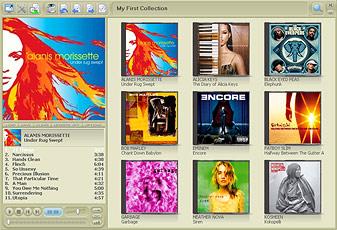
AlbumPlayer offers a mp3, wma, ogg, flac, ape, mpc player which focused on playing albums instead of single files.
Latest Changes:
* Changed: Database changed to MS-Access format, which eliminates the extremely long saving time and also solves the collection editor (not) closing bug
* Added: Read cover art from mp3 files now
* Added: In the album editor, when new cover is found, a dialog is shown with a cover preview. It shows multiple covers when more covers are found as result of one query
* Added: New option in merge dialog: Merge albums to one album, but separate CD's
* Added: "Artist (Display Name)" added as a field. Default behavior stays the same, additionally a user can give an alternative name for instance "Beatles, The" as alternative for "The Beatles". If there is a "Artist (Display Name) defined, it is used for d
* Bug fix: When no AP playlist exists it was not possible to import playlists. Fixed
* Bug fix: when user wants to write folder.jpg, it now always write it even it is already available as system file
* Bug fix: Beep removed on pressing enter in search field