Tuesday, February 17, 2009

Download WinRAR 3.80

WinRAR is a 32-bit Windows version of RAR Archiver, an archiver and archive manager. RAR files can usually compress content by 8 percent to 15 percent more than ZIP files can. WinRAR's main features include strong general and multimedia compression, the ability to process non-RAR archive formats, ZIP compression and decompression, support for long filenames, programmable self-extracting archives (SFX), repair of damaged archives, authenticity verification, embedded file comments, and encryption. Unicode is supported in archive filenames, allowing non-English filenames to be handled painlessly. You can manipulate the parameters of many archives at once and view a volume sequence as a single archive. WinRAR can convert other archive formats to RAR and search for specified text and files in archives.

There are plenty of solid compression utilities to choose from, but this shareware powerhouse offers the features and ease of use that place it at the top of the compression category. WinRAR is easy to use, lightweight, and flexible.

An intuitive interface lets you mouse over icons to see their functions, and if you don't like their candy-coated appearance, you can always choose from several themes at the developer's site. The Folder Tree Panel makes sifting through your directories to find files easier than ever. But once you see the size savings of a RAR archive, with a compression ratio of 8 percent to 15 percent better than the ZIP format, you'll understand why so many users and developers are making the switch from other apps. With virus scans now integrated and minor interface tweaks for Vista, only the slightly slower decompression speed holds the app back.

Beyond its good looks and right-click readiness for basic compression and unzipping, WinRAR offers unpacking support for a large number of archive formats, including TAR, ACE, BZ2, JAR, ISO, and ZIP. WinRAR's advanced features are icing on the cake, with Unicode support for international formatting, embedded file comments, damaged archive repair, archive locking, self-extracting archives, and easy encryption. There's also the option to automatically delete temporary files and just-archived files. Anyone seeking an all-in-one archiving solution would be remiss to not check out WinRAR.


Version 3.80 adds decompression support for AES-encrypted ZIP files, improved display information, more context-menu options, and a more secure method of deleting temporary files.

Download Now (1.18MB)

Download Malwarebytes' Anti-Malware 1.34

Malwarebytes' Anti-Malware is a high performance anti-malware application that thoroughly removes even the most advanced malware and spyware. With one of the fastest, most effective quick scans and malware removal capabilities on the market, this program is the perfect addition to your PC's defenses.

The full version of the product includes a number of key features, including the ability to schedule updates and scans and most importantly, a real-time malware protection module that blocks malicious processes before they even start.

Version 1.34 includes a fix for removing Registry keys with corrupt permissions, improved removal of drivers, improved memory usage, and disinfection for USB-spread infections like Conficker

Malwarebytes Anti-Malware is a surprisingly effective freeware antimalware tool. It's a relatively speedy malware remover, with the quick scan taking about 8 minutes even with other high-resource programs running. The heuristics engine proved on multiple computers during empirical testing that it was capable of determining the difference between false positives and dangerous apps.

The app has some nice features rolled in, too. It supports multiple drive scanning including networked drives, context menu options including a scan-on-demand for individual files, and the FileAssassin option under the More Tools section for removing locked files. The interface is simple, but pleasant-looking and well-organized. Tabs live just below the oversized logo, with few options per tab to keep down the clutter. The installation process was fast enough, but interestingly offered up the well-kept changelog and an instant definition file update.

Do note that the real-time protection is restricted to the paid version, as is the scheduler for updates and scans. Overall, though, Malwarebytes Anti-Malware is a responsive malware remover that does what it should with a minimum of fuss.

Download Now (2.74MB)


Download Avast Home Edition 4.8.1335.90205

Avast Home Edition is a complete ICSA & Checkmark certified antivirus, Checkmark certified anti-spyware & anti-rootkit package. Avast includes the following components: On demand scanner with skinnable simple interface, just select what do you want to scan in which way and press the Play button; On access scanner, special providers to protect the most of available e-mail clients; Instant messaging--ICQ, Miranda; Network traffic--intrusion detection, lightweight firewall; P2P protection for Kazaa, BitTorrent; Web shield--monitors and filters all HTTP traffic; NNTP scanner--scans all Usenet Newsgroup traffic and all operations with files on PC; Boot time scanner--scans disks in the same way and in the same time as Windows CHKDSK does.

Version 4.8.1335.90205 brings many improvements in the scanning engine as well as performance optimizations.

You'll have to register (free) on the publisher site to be able to continue using this program after 60 days.


Download Now (29.81MB)

Download LimeWire 5.0.11

LimeWire is the world's fastest P2P file-sharing application for all types of computer files, including music, video, pictures, games, and text documents. Other features include dynamic querying, file previews during download, advanced techniques for locating rare files, and an easy, clean user interface.

LimeWire's new spam blocker gets rid of junk results, and automatic updates will keep you sharing faster than ever with the latest version. You can search for Creative Commons and Weedshare licensed files, and publish your own creative works with Creative Commons licensing. LimeWire continues its guarantee of no adware or spyware. Includes built-in bittorent support.

Version 5 includes a revamped interface, lets you share files with your friends, and increases security. Version 5.0.11 is a bug-fixing release.

From its start as a post-Napster clone to its leading role as the quintessential Gnutella client, LimeWire is the highest-profile P2P application. Version 5 re-envisions LimeWire for a Web 2.0 world, with an emphasis on sharing with friends, square buttons with rounded corners, and overall a cleaner interface.

Two search bars and two sidebars cap off the redesign. The uppermost search bar is the global search that scans what everybody is sharing over the P2P network, while the secondary one on the right searches your library. The sidebars are set up in a similar way. Both are on the left, with the outer one offering three options: your library, the global P2P network, and your friends. Click on My Library and your inner sidebar shows your collection of music, movies, and documents. The P2P Network option shows what you're uploading and downloading, while the Friends option lets you share your library specifically with your Google/Jabber contacts, which you can import. Search results can be presented in both the new Web 2.0-style that surfaces just the most relevant information, with an Information button to dive deeper or the "classic" spreadsheet view.

The Advanced Tools feature is also new, which lets power users drill down and get highly specific information about who they're connected to, similar to what's available from torrent clients. This data includes IP addresses, bandwidth, the program being used and its version. The new features and overall functionality make this by far the most mature version of LimeWire to date. Despite the typical performance flaws found in all file-sharing clients, this latest version continues to offer solid performance and good looks across the board.

Download Now (15.68MB)

Ad-Aware Anniversary Edition 8.0

One of the first applications built to find and remove adware and spyware, Ad-Aware's excellent reputation is well-justified. The Anniversary Edition continues the publisher's tradition of adroitly addressing user concerns, but is still not quite perfect.

Without a doubt, though, this version of Ad-Aware improves greatly on what has come before. It loads faster during your boot cycle. Scans take less time than before, too--the Quick Scan completed in less than 10 minutes. Although we did notice a major false positive crop up for another program's uninstaller, there were no other flaws in the scan. New users should notice that the app performs faster than integrated antivirus and antimalware programs, because only the paid version of Ad-Aware comes with an antivirus engine.

Some important features are disabled in the free version. While rootkit detection is present, heuristics and real-time registry protection are not. Ad-Aware Free cannot scan networked drives, and even a basic feature like the scheduler remains off-limits to nonpaying customers. The proprietary real-time defender Ad-Watch Live has been reconfigured to run more smoothly in the background, however, and long-time fans will notice the change.

Interface refinements make this the easiest-to-use Ad-Aware yet. Action button placement at the bottom of the pane might feel odd to those familiar with older versions, but the forced continuity between windows is a plus. Links to drill down to more information are easy to see, as is the Settings button. Overall, Ad-Aware continues to make improvements and seems to be unwilling to rest on its malware-removing laurels, but the free version is undeniably hamstrung.

With behavior-based threat detection and integrated real-time monitoring, Ad-Aware Anniversary Edition focuses on core consumer security needs. Instead of adding layers of bells and whistles--thereby slowing your computer and scans down--we have decided to focus on what really matters. Anniversary Edition provides advanced threat protection, and is significantly lighter and faster than our previous versions.

Numerous changes in Ad-Aware Anniversary Edition include: Behavior-based heuristical detection; Ad-Watch Live! integrated real-time protection; Customizable Profile Scans and full integration with Windows Security Center.

Avira AntiVir Personal - Free Antivirus 8.2.0.337

Avira AntiVir Personal Free Antivirus is a comprehensive, easy to use antivirus program, designed to offer reliable free of charge virus protection to home-users only. Avira offers: Extensive Malware Recognition of viruses, Trojans, backdoor programs, worms; Automatic incremental updates of antivirus signatures, engine and entire software; Permanent virus protection, with Virus Guard real time monitoring; Install and configuration in just a couple of steps, setup to protect your PC in minutes; Virus protection against known and unknown threats, using an advanced heuristic system; Scheduler where you can set the scanner to make automatic virus scans or updates on your system; Forum and phone support; Knowledge Base with virus descriptions available on web site; Rootkit Detection and Removal; A modularized AV-search engine for improved scan performance.

Version 8.2.0.337 may include engine updates, enhancements, or bug fixes.

This antivirus program offers rock-solid protection. AVG Free provides the bare necessities, including a real-time shield to prevent infections, anti-virus and anti-malware wrapped up in one engine, and a link scanner for Web surfing with care.

By default, the application is set to search for new virus definitions daily, but you always can use the scheduling tool to change this. Should a virus create serious system problems, AVG creates a rescue disk to scan your computer in MS-DOS mode. The program doesn't tax your system when scanning or when running in the background and always proved effective in our tests. The new interface is much easier to navigate than in previous version, with tabbed navigation on the left assisting users in drilling down to the tools they need.

Though the free version of this program will suffice for average folks, those who demand more control should certainly consider AVG Anti-Virus Professional.

Friday, January 19, 2007

Privacy Policy

Privacy Policy for http://review4software.blogspot.com/

If you require any more information or have any questions about our privacy policy, please feel free to contact us by email at qinai_qiaoni@yahoo.com.

At http://review4software.blogspot.com/, the privacy of our visitors is of extreme importance to us. This privacy policy document outlines the types of personal information is received and collected by http://review4software.blogspot.com/ and how it is used.

Log Files
Like many other Web sites, http://review4software.blogspot.com/ makes use of log files. The information inside the log files includes internet protocol ( IP ) addresses, type of browser, Internet Service Provider ( ISP ), date/time stamp, referring/exit pages, and number of clicks to analyze trends, administer the site, track user’s movement around the site, and gather demographic information. IP addresses, and other such information are not linked to any information that is personally identifiable.

Cookies and Web Beacons
http://review4software.blogspot.com/ does not use cookies.

Some of our advertising partners may use cookies and web beacons on our site. Our advertising partners include Google Adsense, .

These third-party ad servers or ad networks use technology to the advertisements and links that appear on http://review4software.blogspot.com/ send directly to your browsers. They automatically receive your IP address when this occurs. Other technologies ( such as cookies, JavaScript, or Web Beacons ) may also be used by the third-party ad networks to measure the effectiveness of their advertisements and / or to personalize the advertising content that you see.

http://review4software.blogspot.com/ has no access to or control over these cookies that are used by third-party advertisers.

You should consult the respective privacy policies of these third-party ad servers for more detailed information on their practices as well as for instructions about how to opt-out of certain practices. http://review4software.blogspot.com/'s privacy policy does not apply to, and we cannot control the activities of, such other advertisers or web sites.

If you wish to disable cookies, you may do so through your individual browser options. More detailed information about cookie management with specific web browsers can be found at the browsers' respective websites.


Monday, January 08, 2007

Microsoft Windows Vista (Japanese 32-bit) RC1 Build 5600 beta

Windows Vista introduces a breakthrough user experience and is designed to help you feel confident in your ability to view, find, and organize information and to control your computing experience.

The visual sophistication of Windows Vista helps streamline your computing experience by refining common window elements so you can better focus on the content on the screen rather than on how to access it. The desktop experience is more informative, intuitive, and helpful. And new tools bring better clarity to the information on your computer, so you can see what your files contain without opening them, find applications and files instantly, navigate efficiently among open windows, and use wizards and dialog boxes more confidently.

Note: After downloading, you will need to obtain a Product Key from this Windows Website.

Microsoft Windows Vista has the following other editions available: Microsoft Windows Vista (English 32-bit), Microsoft Windows Vista (English 64-bit), Microsoft Windows Vista (German 32-bit), Microsoft Windows Vista (German 64-bit) and Microsoft Windows Vista (Japanese 64-bit).

Microsoft Windows Vista Upgrade Advisor Beta 1 Release Build 1.0.0.54 beta

Windows Vista Upgrade Advisor is a small application that you can run on your current Windows XP-based computer to find out if it's ready for an upgrade to Windows Vista. When you run the Upgrade Advisor, it will scan your computer and generate an easy-to-understand report of any known system and device compatibility issues, along with recommendations on how you can get your PC ready for Windows Vista. Microsoft plans to add functionality to Upgrade Advisor, such as checking how your software applications will run with Windows Vista. Download the beta version today and check this site in a few months for a new version.

Advanced Vista Codec Package 4.2.0

With Advanced Vista Codec Package installed, you shouldn't need to install any other codec or filter. Many user suggested default settings are implemented. This package does not contain a media player and does not associates filetypes. With this package installed, you will be able to use any media player to play DVD's, movies and video clips such as quicktime, realmedia, avi, mpeg, Flv, swf, wmv, etc. Streaming video can be played within web browsers. By default, you shouldn't need to make any adjustments to enjoy playback immediately.

Latest Changes:

  • Several Vista improvements with filetype handling
  • Modify how QT video is streamed within Vista Internet Explorer
  • Add Gabests' MpegSplitter for Vista compatibility
  • Update 64bit addon localizations [visit the homepage]
  • Update FFDshow components to t601
  • Fully WindowsXP compatible

Vista Shortcut Overlay Remover 1.2

Vista Shortcut Overlay Remover 1.2
Publisher's Description:

Windows Vista Shortcut Overlay Remover allows you to either remove or enable the explorer shortcut overlay arrow that is added to all shortcuts. Currently there is no native way to remove the shortcut overlay arrow or to even customize it in Windows Vista.
Latest Changes:

* Support x86 and x64
* Fixes issue with Favorite links folder
* Adds the ability to choose a light arrow

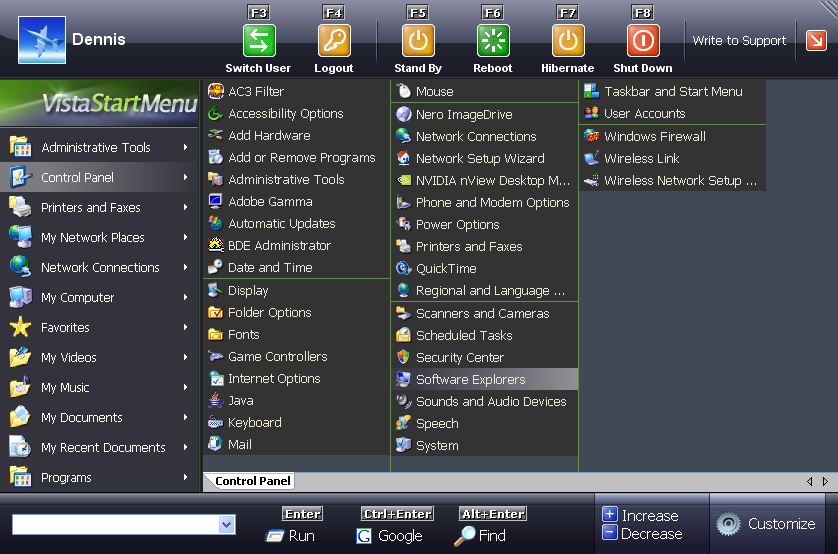
Vista Start Menu 2.1

Vista Start Menu is a convenient alternative to the «Start» menu. It is much easier to find and run the program you need. Everything is visual and extremely easy to use. Your applications are arranged in a table with icons divided into groups, which makes it easier to work with a lot of programs.

Latest Changes:

  • The performance rate has considerably increased due to splitting into threads
  • The program has a new icon
  • Sorting is now available (leave in places, sort by name, sort by name and type)
  • Now you can specify the main program in each folder manually and use the entire power of the «single-click launch» feature
  • Update check feature. Now you can learn about the releases of new version by just clicking the logo of Vista Start Menu

Screenshot:

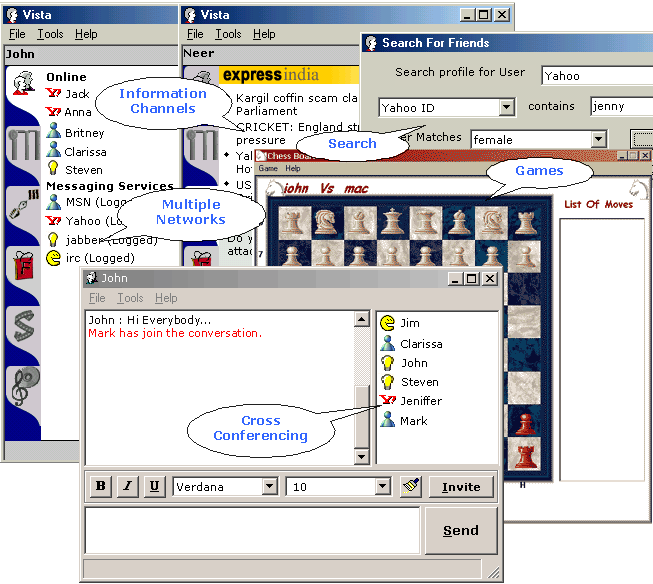
Vista 2.0.0.3947

Vista is a universal Web services client that supports Channels for Information and Content via
XML/HTTP/SOAP/XML-RPC. It is a cross conferencing client across AOL, ICQ, MSN, Yahoo, Jabber, and IRC messaging services. It lets you develop your own custom Web service clients that can be deployed on the platform using your current skill sets. It allows you to customize it by adding and removing channels/features.

Latest Changes:

  • Improved Stability on all transports

Screenshot:

Kaspersky Anti-Virus Personal 6.0.2.546 Beta

Kaspersky Lab's state-of-the-art technology provides relief against the constant headache of virus related attacks. It automatically checks for viruses in all incoming and outgoing messages in real time, and will prevent viruses from penetrating your computer. The anti-virus scanner provides a comprehensive check of all local and network drive contents on demand. You may start your scanner manually or schedule its start with Control Center.

Kaspersky Anti-Virus Personal is powered by a unique integrated technology for unknown virus searching, based on the principals of second-generation heuristic analysis. Because of this, the program is able to protect you from even unknown viruses. By using the integrated Control Center in Kaspersky Anti-Virus Personal, it enables you to create a flexible schedule for the program components to be started and to automatically download and apply updates to your anti-virus databases via the Internet.

Kaspersky Anti-Virus has the following other editions available: Kaspersky Anti-Virus Personal Pro, Kaspersky Anti-Virus for Windows File Servers and Kaspersky Anti-Virus Lite.

Acoustica Mixcraft Recording Studio 3 Build 5 Beta

Mixcraft Recording Studio is multitrack audio software with effects, featuring Reverb, Distortion, Delay, EQ, Compressor, Flanger and Chorus, as well as resonant filters and a powerful loop editor. The high performance 32 bit sound engine supports broadcast quality WAV files and will even import compressed MP3, OGG & WMA files. Use it to record your own music, your band or even a remix for a dance recital. The amazing fact about home recording today is that you really only need a computer and good multitrack recording software such as Mixcraft to create amazing sound. When you’ve finished your mix, publish it to the Internet as an MP3, OGG, WMA or RealAudio file, or render it to burn it with an CD burner.

SBMAV Disk Cleaner 3.0 Beta 7

SBMAV Disk Cleaner is a powerful tool for cleaning disks from information that clogs your system and reduces the performance of your computer. With the help of this tool you can search and delete temporary files and folders and other applications, search for invalid links to documents that don't exist, uninstall software, disable/enable unused fonts, delete Cookies, and search and remove duplicate files. You can also use this tool to work with your documents: to find and delete old back-up files and duplicates based on different criteria. The program has a friendly user-interface and is easy to use. The disk cleaning process can be launched automatically using the command-line, reducing your participation to save you time.

Sunday, September 17, 2006

Virtual databases: An alternative solution

Server virtualisation is an efficient way to save on server hardware
costs, real estate, and management resources, but it isn’t the
only way. Just ask the folks at Avanade, a systems integrator
specialising in Microsoft solutions. For one government customer,
Avanade had originally designed hundreds of SQL Servers in highly
available MSCS (Microsoft Cluster Server) clusters, but the system was
spiralling out of control.


“We had roughly 50 percent of the SQL Server nodes acting in a
passive capacity,” says David K. Miller, Avanade’s director
of technology and infrastructure in the U.K. “This was a
potentially huge expenditure in server hardware, rack space, network
and storage infrastructure. And we still had to monitor and patch them
all.”


To reduce both its hardware and database software costs, Avanade
turned to PolyServe Database Utility for SQL Server, which is based on
the company’s Matrix Server virtualisation technology. As opposed
to traditional server virtualisation, PolyServe uses a symmetrical
cluster file system to allow all servers in a cluster to see all the
data within the Windows file system, creating a single, virtualised
storage and server pool. Previously, some instances of SQL Server might
have used only 10 percent of their available storage, whereas others
were bursting at the seams and would need to be taken offline to expand
their storage. Sharing the storage pool improves overall storage
utilisation, while still giving the performance benefits of dedicated
servers.


PolyServe also gave Miller more hardware flexibility. “Unlike
with MSCS, all the nodes in the cluster don’t have to be
identical, so we had the option to mix two-way, four-way, and eight-way
servers in the same cluster,” he says. “This would allow us
to move an instance of a SQL Server from a two-node to an eight-node
server for heavy overnight batch processing, while moving the off-peak
online traffic from the eight-way to a four-way or two-way server at
the same time, then moving them back the next morning.”


PolyServe’s “dynamic rehosting” feature can move
SQL Server instances from server to server in seconds. It also allows
every server in a cluster of as many as 16 nodes, active or passive, to
act as a fail-over target for every other server. Compared with MSCS,
which limits a cluster to eight nodes, Miller estimates that
PolyServe’s approach has reduced the number of passive nodes by
80 percent across the enterprise.


“Server virtualisation was not the answer for us, as the
processing requirements of our SQL Server deployments really required
us to put them on their own physical platforms,” Miller says.
“PolyServe’s product allowed us to reduce the number of
physical servers by reducing the number of passive nodes.”


Contact: 


PolyServe, Inc.


(001 503-617-7574)


powered by performancing firefox


powered by performancing firefox

Mozilla Patches Firefox, Thunderbird


Mozilla Corp. Thursday updated its Firefox browser to fix 7 flaws, including 4 pegged by the open-source developer as "Critical."

Of the four critical vulnerabilities patched in Firefox 1.5.0.7, none are currently being exploited, Mozilla said in detailed descriptions of each fixed flaw.
In fact, Mozilla said in several of the descriptions that it was not
sure whether the specific vulnerabilities could be exploited, but had
issued patches just in case.


"We presume that at least some of these could be exploited to run arbitrary code with enough effort," Mozilla stated in one patch's explanation.


That jibes with recent comments made by the company's new security chief, Window Snyder, who pointed out in a Tuesday interview that Mozilla's developers fix bugs even if they can't prove they are exploitable.


Two of the remaining 3 patches were labeled as "Moderate," while the third was tagged as "Important" by Mozilla. Danish vulnerability tracker Secunia, on the other hand, gave the update a collective "Highly critical" rating, its second-most-dire ranking.


Mozilla also updated the Thunderbird e-mail client to 1.5.0.7, and patched 6 vulnerabilities, 2 of them critical.


The independent Camino and SeaMonkey projects updated their applications Thursday, too. The former, a native Mac OS X browser, moved up to version 1.0.3
by fixing several critical security and stability problems, and
integrated the patches to the most recent Gecko rendering engine. SeaMonkey, which is a follow-on to the discontinued Mozilla browsing suite, migrated to version 1.0.5.


Firefox 1.5.0.7 and Thunderbird 1.5.0.7 can be downloaded from the
Mozilla site. Existing users, meanwhile can update from within the
browser or e-mail client (Help|Check for Updates in the Windows
version), or wait for the automatic update service to kick in.


The new versions are available for Windows, Mac OS X, and Linux in 37 language-localized versions.


powered by performancing firefox

Adobe profit tops forecast

Design software maker Adobe
Systems Inc. (Nasdaq:ADBE - news) on Thursday posted a lower quarterly
profit as expenses rose, but results topped average Wall Street
forecasts and shares rose 8 percent.

Martin Pyykkonn, an analyst at Global Crown Capital, said
the results reassured investors that demand remained healthy
for Adobe's Creative Suite 2 offering and other products and
that customers were not putting off purchases until new
software releases next spring.


"The results showed some unexpected upside," Pyykkonn said.
"It looks like the situation is playing out where you don't
have a dramatic fall off in a product cycle and then a rise."


The maker of PhotoShop software said third-quarter net
income fell to $94.4 million, or 16 cents per share, from
$144.9 million, or 29 cents per share, a year ago as the
company.


Excluding items such as expenses related to its acquisition
of Macromedia, the company said it posted a per-share profit of
29 cents.


On that basis, analysts on average were expecting the
company to post a profit before items of 26 cents per share on
revenue of $594.2 million, according to Reuters Estimates.


Adobe bought Macromedia last December for $3.4 billion to
complement its strength in editing and distributing static
content such as text, photos and graphics with Macromedia's
ability to create Web graphics and advertising in its Flash
technology.


The company said expenses rose to $422.7 million from
$276.0 million as the software maker spent more in areas such
as sales and marketing and booked charges related to
Macromedia. Still, Chizen said the company was able to keep
costs down.


Revenue rose to $602.2 million from $487.3 million as sales
of the company's Acrobat file-sharing product were better than
expected, said Chief Executive Bruce Chizen.


Looking ahead to the current fourth quarter, Adobe forecast
revenue of $655 million to $685 million, with earnings per
share before items ranging from 32 cents to 34 cents.


The Wall Street view was for fourth-quarter revenue of
$670.5 million and earnings per share before items of 32 cents.


Adobe shares rose 8 percent to $36.26 in extended trading
from a Nasdaq close of $33.65.


powered by performancing firefox

Microsoft Intros PC Hardware

Microsoft introduced three new wireless desktop hardware systems
intended to streamline basic PC functions, such as launching software
applications and listening to music. The Wireless Entertainment Desktop
hardware includes mice, keyboards and videocameras, as well as a start
button which opens the forthcoming Vista operating system with one
touch.

"As operating systems become more complicated, people need an easier
way to access all of the applications and functions of the latest
computers," said IDC analyst Bob O'Donell. "Microsoft has spent a lot
of time and money developing desktop hardware that offers more
convenience in getting to all of those functions."


O'Donell cited the new backlit keyboard, which can sense low-light
conditions, as an innovative feature with practical value for those
working in a variety of environments. And Microsoft's gadget buttons on
the new mouse and keyboard products let users quickly get in and out of
utilities, such as a calculator or calendar, said O'Donnell.


Easy Access to Apps is Key


Out of the three versions available, at the top of the line is the
$250 Wireless Entertainment Desktop 8000, which includes a
rechargeable, laser mouse and a backlit keyboard, both of which used
Bluetooth short-range wireless technology.


Other options include the $150 Wireless Entertainment Desktop 7000
which is basically the same except the components are not rechargeable
and the keyboard does not have backlit keys.


The keyboard that comes with these two options has several "hot
buttons" for opening utilities like instant messaging and video calls,
or accessing the integrated media center to play music or movies.
Likewise, the mouse has buttons that can be set to serve as media
player controls. One-click access lets you see all open windows and
applications at once. Both the keyboard and mouse can be plugged into a
charging station.


The $100 Wireless Laser Desktop 6000 is a keyboard/mouse package
that includes a wireless laser mouse and is available this month.


Microsoft also unveiled a wireless mouse for laptop users, the
Notebook Presenter Mouse 8000, that can be used by road warriors during
business conferences as a slide presenter, a laser pointer and an
audio/video remote control.


"The popularity of wireless peripherals has grown dramatically,
especially among those who may want to refresh their computer systems
without buying a new PC," O'Donell said.


powered by performancing firefox